
Example
Loading the AI video generator…
Loading the AI video generator…
AI video generator
Type an idea or add a photo, and get a short video with sound. Your first video is free, and you don't need to sign up.
Background video made with this generator (Native · Quality · 768p)
These clips came straight out of the tool on this page. We didn't edit them. Turn the sound on: the audio was made by the AI too.
One sentence, no photo. The AI made the dog, the yard, the slow motion and the barking.
Prompt: A golden retriever puppy chases soap bubbles in a sunny backyard. Slow motion, soft light, happy barking.
Settings: Base · Standard · 768p · 5s · 16:9
Real output, no editing
We used an AI photo of a girl reading as the first frame. She looks up, smiles and waves.
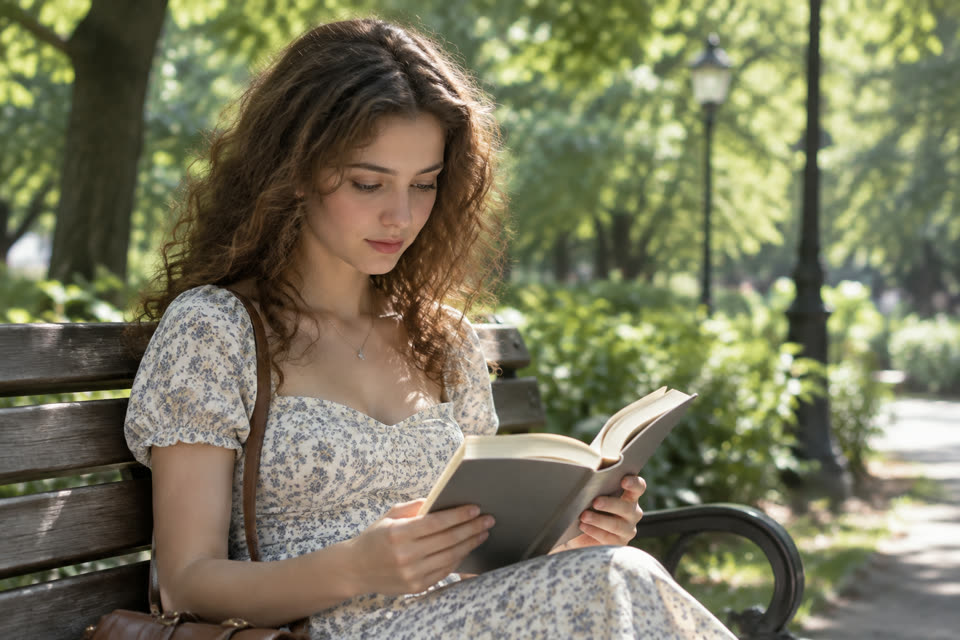 First frame
Prompt: She looks up from her book, smiles at the camera and waves. Leaves move in the breeze and birds chirp in the park.
Settings: Character · Fast · 768p · 5s · 3:2
Real output, no editing
A 9:16 clip for phones, made with Native. The writing on the cup is made up by the AI.
Prompt: Close-up of a barista pouring latte art into a white cup in a cozy cafe. Steam rises, warm light, quiet cafe chatter.
Settings: Native · Fast · 768p · 5s · 9:16
Real output, no editing
Pick the tab that matches what you have. Every way works in the free AI video generator.
Write what should happen, and the AI makes the whole scene. Say who is there, what they do, and where.
Add one photo as the first frame, the last frame, or both. The AI fills in the motion in between.
Add up to 9 photos, one short clip and two sounds. The AI uses them as a guide for people, places, motion and sound.
A free AI video generator is handy in lots of places. Here are a few ideas to start with.
Make a 9:16 video for Reels, Shorts or TikTok from one sentence.
Add a photo as the first frame and describe what happens next.
Show a science idea, a story scene or a historic moment in a few seconds.
Turn a product photo into a short clip that spins, glows or shows it in use.
Test a scene for a comic, a game or a short film before you make it for real.
Make a birthday clip, a meme or a silly scene with your pet.
You can change both before every video. If you aren't sure, start with Base on Fast.
| Model | Best for | Price |
|---|---|---|
| Base | Most prompts. Start here. | Lowest |
| Character | People and faces, and putting someone from a photo into a new scene. | Same as Base |
| Native | Fine detail and lighting. | Higher |
Quality levels go from Fast to Standard, Enhanced and Quality. Higher levels put more work into each video, so they cost more and can take longer.
Your first video is free. After that, each video uses credits from your account. The table shows credits for a 5, 10 or 15-second video.
| Model and size | Fast | Standard | Enhanced | Quality |
|---|---|---|---|---|
| Base / Character · 480p | 1 / 1 / 2 | 1 / 2 / 3 | 2 / 3 / 5 | 2 / 4 / 6 |
| Base / Character · 768p | 1 / 2 / 3 | 2 / 3 / 5 | 3 / 6 / 9 | 4 / 8 / 12 |
| Native · 480p | 1 / 2 / 3 | 2 / 3 / 4 | 2 / 4 / 6 | 3 / 5 / 8 |
| Native · 768p | 2 / 3 / 5 | 3 / 5 / 8 | 4 / 8 / 12 | 5 / 10 / 15 |
The free AI video generator works online, right in your browser. There is nothing to install.
Pick Text, Image or Reference. Then write what should happen in one or two clear sentences.
Pick a model, a level, a size, a length and a shape. The button shows the price before you start.
Press Generate and wait a few minutes. Then watch your video and download it as an MP4.
Clear prompts get the best results from a free AI video generator. These habits help.
AI video is new. Results can surprise you, in good ways and bad ones.
Yes, your first video is free. It is 5 seconds long at 480p, made with Base on Fast. After that, videos use credits. A video costs 1 to 15 credits, based on the model, level, size and length.
Not for your first video. Open the free AI video generator, type a prompt and press Generate. To make more videos, sign in and get credits.
Most videos take 2 to 8 minutes. A 5-second 480p video on Fast is quickest, at about 3 minutes. Native and 768p take longer. You can leave the page and come back.
Yes. Every video comes with sound that the AI makes to match the scene. In Reference mode you can also keep the sound of your own clip.
No. We don't add a watermark, and you download a clean MP4 file.
Photos can be JPG, PNG or WebP up to 20 MB. Clips must be MP4, up to 15 seconds and 50 MB. Sounds can be MP3 or WAV, up to 15 seconds and 15 MB.
Base works well for most prompts and costs the least. Character is tuned for people and faces. Native shows the finest detail and lighting, and it costs more.
The videos come from MiniMax H3. Base, Character and Native are three versions of it.
You get your credits back. A failed or blocked free video doesn't use up your free try, so you can try again.
No. Daily free credits are for photo tools only. Videos use the free video or credits you buy. Bought credits work in every tool on the site.
Write one sentence and press Generate. Your first video from the free AI video generator costs nothing, and you don't need an account.